Instant Mold review and tutorial

Here is a little tutorial/review for the Instant Mold product that has been released by Cool Mini or Not (called CMON later in this article) some time ago.

Instant Mold review

The product should be available on their website in the Shop section. I’m not going to repeat what this product is aimed for since it’s clearly said in the description.

Photo: Instant Mold Review and Tutorial

Instant Mold is cleary a nice product. You can do a lot of things, not everything but still lots. The level of details you can get is just breathtaking (of course it also depends on the original item). With a little training, you can do things like bases, weapons, and some other accessories, reaching a nice level of quality.

Warning: If you’re expecting to have in putty/green stuff/miliput or even resin the exact same quality as the original product, you would be disappointed and you don’t need to read what’s following. Though, if you can live with something that is of a nice quality but not perfect, then, you’re good to go.

CMON said on their website: “Make your own bits” and that is exactly what I needed.

For the record, I started a Salamander army for Warhammer 40K, but even though Games Workshop and Forge World released a few things for this army, they unfortunately forgot (or didn’t want) to add the Salamander’s Insignia in the drop pod kit, so I decided, thanks to the Instant Mold, to make one.

I’m not going to repeat how to use the Instant Mold, it has been seen on CMON website and you’ll find hundreds of tutorials on the web, though it’s always nice to have some little tips which I’ll try to give here.

Here is what I used

  • The item you want to mold (here it’s a FW front door for a Rhino)
  • Instant Mold
  • Something to cut with (scalpel, cutter)
  • Something to pick up the Instant Mold from the hot water
  • A little piece of plastic card
  • Something to make a container/framework for the mold and something to press the item in it (here some Legos, the number is depending on the size of the item you want to mold)
  • Some stuff (here it’s Green Stuff but you can also use Milliput, Putty…)

Photo: Instant Mold Review and Tutorial

The box

The first thing you want to make is to make the box that’ll be used as container. I tried doing it without and I ended lots of time having parts that weren’t molded properly or bubbles which wasn’t nice. I noticed that with the container everything was molded nicely.

The flat pieces in the bottom are there so that you can press heavily the item in the mold without ruining it with the circles of the Legos

Photo: Instant Mold Review and Tutorial

Photo: Instant Mold Review and Tutorial

Now that we have everything ready, we can start working with the Instant Mold.

Heating it up

After having put it in hot water (I have a boiling machine like the CMON guy and I put it in a bowl and then through the Instant Mold inside it) and have it ready, I place it in my container. I’m doing this in multiple times to be sure that I don’t have holes in the mold, or stuff that will make the final result crap.

Photo: Instant Mold Review and Tutorial

Once you have fill the whole space with the Instant Mold, as you’ll notice, now, there are finger prints and bumps/holes all over the Instant Mold, so to avoid having a bad mold, I put it back like this in the hot water, taking care of not pressing it or whatever to soften it again a little so that I’ll be able to remove the fingerprints and bumps/holes using the plastic card

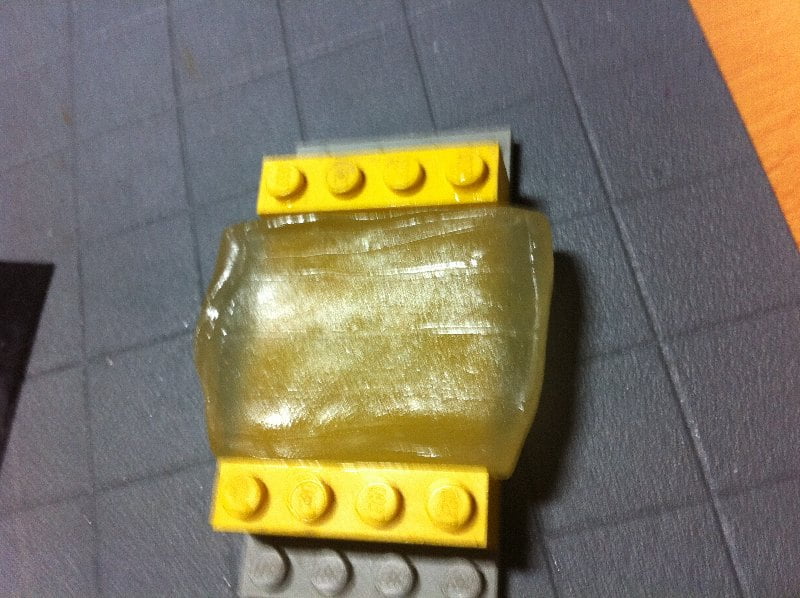
Photo: Instant Mold Review and Tutorial

Photo: Instant Mold Review and Tutorial

Push it!

As you can see, it’s not perfect, but it’s better. If you’re fast, you can directly press your item into the mold (I personally put it back in the hot water one more time, but it’s me) using something to press.

Photo: Instant Mold Review and Tutorial

Photo: Instant Mold Review and Tutorial

Once you’ve pressed it, you should have something like this:

Photo: Instant Mold Review and Tutorial

Now you wait a little so that the mold hardened itself. Don’t try to remove the item from the Instant Mold while the Instant Mold is still soft, you might break some details here (and it’s not what you want). It takes usually 4-5 minutes to be completely hard, so be patient. You can check, while Instant Mold is hardening, if you don’t have bubbles or anything by flipping it.

Photo: Instant Mold Review and Tutorial

If there are bubbles or anything, you should see it clearly. When everything is hard, you can remove the item from the mold.

Cleaning up

Now the next step isn’t necessary, but I found it easier. Cut the part that aren’t necessary
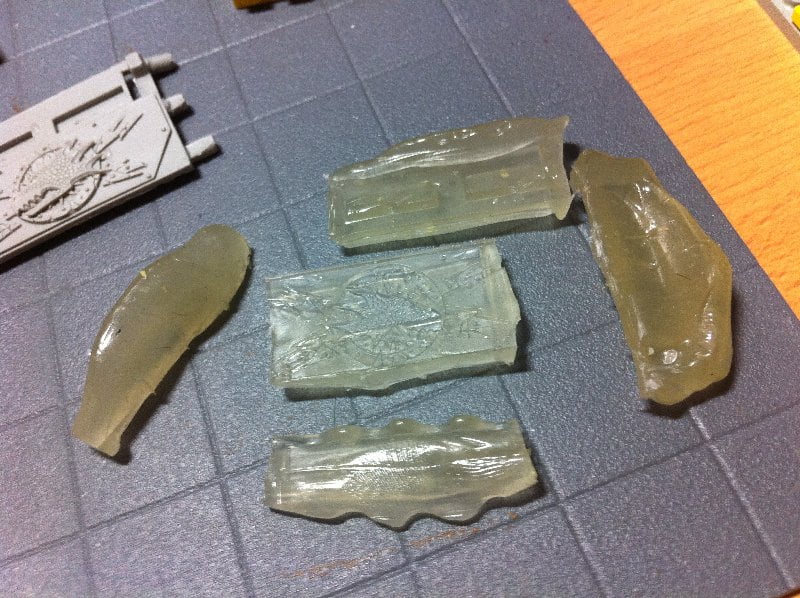
Photo: Instant Mold Review and Tutorial

Molding

Once everything is clean, just prepare and put your putty/green stuff/miliput inside the mold.

Photo: Instant Mold Review and Tutorial

Photo: Instant Mold Review and Tutorial

Now, you just have to wait for it to harden. I personally wait like 8 hours. Why? Simply because I just want to be sure that everything is completely hard, because there are multiples micro details that are so easy left inside the mold.

Done!

Once everything is hard, you can easily unmold it by peeling off the stuff you used from the IM, no need to put the mold in hot water again (especially if you want to re-use it for the same item) because, even when green stuff is still pretty sticky, it won’t stick to the IM. Now you can just see the result.

Photo: Instant Mold Review and Tutorial

Do you think Instant Mold is the answer to your needs? Is the quality sufficient? Did you have any problems wih it? Why don’t you share your comments about Instant Mold here?

Thanks,

— Hellspawn
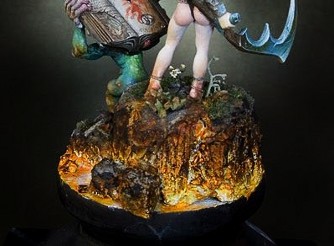
Lava tutorial – Base for Taxxis

A long long time ago…. 😉
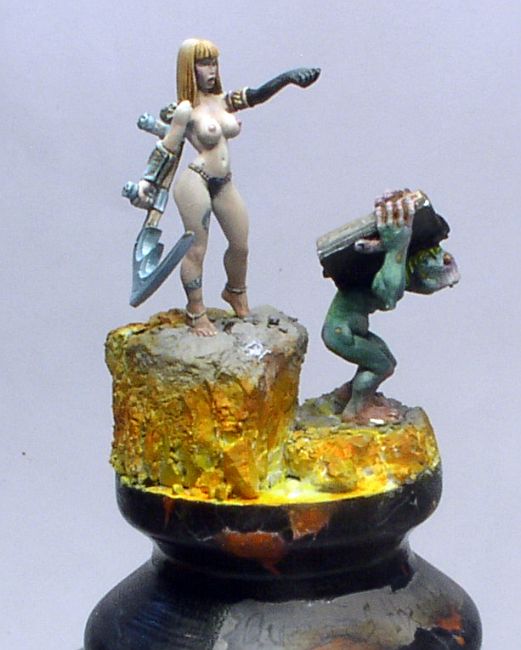
… various lighting effects were quite trendy (and now they’re pretty oldschool, so maybe nobody cares for a lava tutorial?). Current trends in miniature painting moved away from them – which is partially caused by currently trendy color schemes. Natural colors and realistic compositions are popular now.

Why write a lava tutorial?

My ignorance made me chose this lava effect anyway, or maybe it was my contrariness? Because I still approached this subject in a different way than in the days when the whole painting community was amazed by bright and vivid colors and sharp lighting. I minimized the effect of lighting and I hope it’s enough to avoid calling this paintjob OSL 😛 After all it would make this article an OSL tutorial instead of a lava tutorial – and it’s not the purpose 😉

I don’t know if in this situation anybody is interested in a lava tutorial, but I’ll encourage you by saying painting lava can be very easy!

Photo: How to paint lava - tutorial - Taxxis queen of undead

Preparations

This lava tutorial isn’t anything unusual, so just like with most tutorials, it’s best to start with the very preparations. On grey basecoat I applied white paint to the parts where lava and glowing cracks were to be seen. I needed a few layers as the paint had to be smooth.

Photo: How to paint lava - tutorial - Taxxis queen of undead

Photo: How to paint lava - tutorial - Taxxis queen of undead

Photo: How to paint lava - tutorial - Taxxis queen of undead

Photo: How to paint lava - tutorial - Taxxis queen of undead

First colors and choice of paints

When it was dry I left white in the hottest parts, and brushed Vallejo Model Color Transparent Orange. It cannot be called drybrushing, because if you have worked with Vallejo transparent paints you know how hard it is to do. Take an old big brush, and when you load it with paint, remove the excess so that the paint doesn’t run into recesses. Transparent paints are very saturated and so without big effort I achieved first effect of glowing with just two layers.

Photo: How to paint lava - tutorial - Taxxis queen of undead

Photo: How to paint lava - tutorial - Taxxis queen of undead

Photo: How to paint lava - tutorial - Taxxis queen of undead

The heat is on!

Where the heat is less intense (which means toward the top) I applied stronger orange color. I don’t know if this stage can be omitted, so if you feel like experimenting this might be the right and not very risky moment for trying. 😉 For this stage I used Transparent Orange mixed with Transparent Red (both from Vallejo Model Color range) and applied this mix onto a smaller surface than previously with the same technique similar to drybrushing.

Photo: How to paint lava - tutorial - Taxxis queen of undead

Photo: How to paint lava - tutorial - Taxxis queen of undead

Photo: How to paint lava - tutorial - Taxxis queen of undead

Photo: How to paint lava - tutorial - Taxxis queen of undead

Photo: How to paint lava - tutorial - Taxxis queen of undead

Photo: How to paint lava - tutorial - Taxxis queen of undead

Photo: How to paint lava - tutorial - Taxxis queen of undead

Photo: How to paint lava - tutorial - Taxxis queen of undead

Cooling down…

I was happy to use the Black Ink from the P3 range, which I thinned even more, I brushed it onto the horizontal surface of the rocks and I also caught a part of the highest rock.

Photo: How to paint lava - tutorial - Taxxis queen of undead

Photo: How to paint lava - tutorial - Taxxis queen of undead

Then I took black paint and – like on the picture – drybrushed the sides in the very normal way. Once and twice, and… I don’t remember how many times, but I believe you will see when it should stop. You see – we even found use for drybrushing in our lava tutorial!

Photo: How to paint lava - tutorial - Taxxis queen of undead

Photo: How to paint lava - tutorial - Taxxis queen of undead

Photo: How to paint lava - tutorial - Taxxis queen of undead

Photo: How to paint lava - tutorial - Taxxis queen of undead

Photo: How to paint lava - tutorial - Taxxis queen of undead

Not so harsh!

To soften the contrast between blacks and hot parts I mixed Transparent Orange with Woodgrain. It’s important to keep this layer transparent, because no opaque layer would join the parts we’ve already painted.

Photo: How to paint lava - tutorial - Taxxis queen of undead

Photo: How to paint lava - tutorial - Taxxis queen of undead

If you don’t have transparent paints, then I would suggest to start the whole painting from pale and cold yellows, and then add darker and warmer shades. And when we reach this point I recommend going from yellows to dark warm reds, and only now brushing it with black paint.

Detailing

Now it’s time to improve details, as real lava is speckled, and if you feel like playing a bit more, just take white, orange, or orange with woodgrain, and splatter some of it onto the surfaces. You just need to aim well! 😉

Photo: How to paint lava - tutorial - Taxxis queen of undead

Photo: How to paint lava - tutorial - Taxxis queen of undead

Photo: How to paint lava - tutorial - Taxxis queen of undead

Finishing touches

No lava tutorial would be complete without the finishing touches… So now I brushed the upper parts of the most protruding rocks with light grey, and added some vegetation which wasn’t burnt by the heat. In normal conditions I wouldn’t expect anything to survive… but I am no expert in lavas as I live in a pretty safe region, but for this model it seemed acceptable.

Photo: How to paint lava - tutorial - Taxxis queen of undead

Photo: How to paint lava - tutorial - Taxxis queen of undead

The finished model can be seen in my gallery.

Tell me, please, if you found this lava tutorial helpful. There is a follow-up to it on my Painting Mum blog, which presents a slightly different approach to the subject. Can you tell me which one suits your needs better and why? Thanks!

UPDATE: If you would like to know how to make more dynamic, splashing lava, follow the link to my other tutorial: How to make lava splashes. Enjoy 🙂

— Ańa

Simple bases in 5 steps

We keep being asked if we’re ever going to publish any tutorials for beginners in the miniature painting hobby. Sure, why not!


To get started with these articles, let’s follow these five easy steps to make nice but simple bases for your gaming miniatures.

Let me show you a simple and quick method for making bases.

What do we need to make our simple bases?

  • sand,
  • static grass,
  • white glue,
  • superglue,
  • bases,
  • cork,
  • paints: Bestial Brown, Vomit Brown (Citadel) and Lupin Grey (HMG Paints) or Space Wolves Grey (Citadel)

Photo: How to make simple bases in 5 steps - Tutorial

Step 1

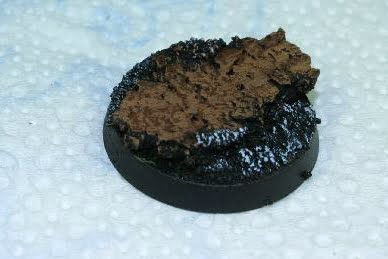
Glue a piece of cork to your base using superglue.

Photo: How to make simple bases in 5 steps - Tutorial

Step 2

Glue some sand to your base using white glue to cover free space on the base.

Photo: How to make simple bases in 5 steps - Tutorial

Step 3

Paint the whole base black.

Photo: How to make simple bases in 5 steps - Tutorial

Step 4

Cork: paint with Bestial Brown and then drybrush with Vomit Brown.
Sand: drybrush with Lupin Grey.

Photo: How to make simple bases in 5 steps - Tutorial

Step 5

Use superglue to glue a mini to your base and white glue to add static grass.

Photo: How to make simple bases in 5 steps - Tutorial

Your base is ready! 🙂

You see, it wasn’t all that difficult.

Now if you would like more tutorials for beginners, just write what you would like to read about. What subjects would be the most interesting for you. We will do our best to follow your suggestions.

How to sculpt crab legs and pincers

Another little tutorial for my Tyranids, this time we will concentrate on How to sculpt crab legs and pincers that can be very valuable for different projects, from crustaceans to insect segmented legs or just a nasty chaos mutation.

Step 1: Things I need

  • Modeling putty (green stuff)
  • Water
  • Hobby knife (cutter)
  • Pin vice
  • Clay shaper brush
  • Sculpting tool
  • Paper clips
  • Toothpick
  • Flat surface

Photo: How to sculpt crab legs and pincers - Tutorial

Step 2: Structure

Photo: How to sculpt crab legs and pincers - Tutorial

For starting with a strong internal structure I opened a paper clip and bended it to the desired shape.

Mixed a bit of green stuff and apply it directly on to the wire, with no precautions concerning smooth or clean green stuff surface, since it is just a skeleton sketch of the final crab leg.

Step 3: Smooth shapes

After green stuff is cured its time to start building the final shape, so I mix a bit of the paste and apply it to the structure. It’s better to work on one side of the structure and let it dry before going for the other half, so we start with the left side of the crab leg.

Photo: How to sculpt crab legs and pincers - Tutorial

Use the clay shaper brush dipped in water and start smoothing the edges of the green stuff, take your time here and use always lots of water.

Photo: How to sculpt crab legs and pincers - Tutorial

So, when left side is sculpted and smoothed let it dry and only then, go for the right side of the crab leg. You can sculpt the shape you wish just avoid it to be to uniform since it’s a crab leg irregular shapes work best. You should now have something like this.

Photo: How to sculpt crab legs and pincers - Tutorial

Step 4: Spikes and final contour

Photo: How to sculpt crab legs and pincers - Tutorial

And the fun begins, while the stress of waiting for curing times is growing on you we can use one of those endless curing breaks to sculpt some little spikes for our crab legs, do some random sizes and shapes. And for those that say crabs don’t have spikes on legs I say: Who cares it looks great. 😉

I hope everyone knows how to sculpt spikes but for the more hesitant sculptors here is how I do them. Do one little ball of green stuff and put it on a flat surface, then dip fingers on water and start pressing green stuff against surface with vertical movements, just let it dry. Piece of cake.

Now, with all stuff cured, choose one cool spike and mix a ball of green stuff, to use its sticky properties, for “gluing” the spike to the leg.

Photo: How to sculpt crab legs and pincers - Tutorial

For better blending the spike to the crab leg lay a layer of green stuff over the junction

Photo: How to sculpt crab legs and pincers - Tutorial

Its time for the final claw spike and this time we will use the paper clip extremity for a stronger merge. First with a cutter do a cut on another spike and then use a pin vice to do a small hole in it. Mix a bit of green stuff and squeeze the spike against it passing the hole on to the paper clip. This should make a stronger bond, but before you finish you need to smooth the paste with clay shaper dipped in water.

Photo: How to sculpt crab legs and pincers - Tutorial

Step 5: Texture

With all shapes finished its time for texturing those legs. I started by putting some spikes on the legs, since you already sculpted several spikes just cut them to the desired size and use green stuff for gluing them to the leg. In this process I use mainly sculpting tool and toothpick dipped in water to sculpt the junction of spike to leg. You could also use pins but since the spikes are small there’s no need for that.

Photo: How to sculpt crab legs and pincers - Tutorial

Finally I will try to do those micro organisms and corals that usually we see on crustaceans. Simply cut several random sized small balls of green stuff and again with the help of a toothpick and sculpting tool stick them randomly on the crab leg, also try to shape the balls on the leg with interesting forms.

Photo: How to sculpt crab legs and pincers - Tutorial

Conclusion

Photo: How to sculpt crab legs and pincers - Tutorial

Well that’s it, you now can sculpt crab legs for your projects, if you noticed you can do different shapes on legs or even more segmented ones, funny thing I noticed is that the smaller legs look like scorpions tails’ hope you enjoyed it.

— Pedro Navarro

How I painted wings for a Demon Prince of Nurgle

It must have been in 2008 that I painted two commissioned Chaos Demon Princes of Nurgle in that pre-heresy color scheme (white armor with green decorations). At the time everybody used winged Demon Princes for Warhammer 40.000, so these had to have wings, too. So I used wings from Heresy Miniatures B’hakoth model, converted them and painted in a disgusting Nugle way. But this only started the series of questions how I painted these rotting leathery wings. To avoid responding to every question separately, I created this tutorial showing how to paint wings for a Nurgle Demon Prince.

Photo: How to paint Demon Prince of Nurgle wings - Tutorial

Here’s the first wing. It’s more or less finished, and at this point I decided to take pictures of the process of painting the other wing.

Photo: How to paint Demon Prince of Nurgle wings - Tutorial

Generally I don’t try to analyze or organize thoughts clouding in my head in any logical way… (otherwise I might decide that if I don’t know where to start, I should not start at all ;-))

I prefer to go all ahead instinctively… to keep my thoughts busy (especially to keep my left hemisphere busy, so that it doesn’t disturb the right one :-P) and to start painting… and to hope the rest will be fine somehow.

What I did first was outlining the shape of the “skin” which remained on the wing.

I think it wasn’t a bad choice because in case anything had been wrong, I still could correct it easily, because this light blue color would be easier to cover than red.

Photo: How to paint Demon Prince of Nurgle wings - Tutorial

The blue color is probably a mix of P3 Coal Black + P3 Menoth White Highlight / Vallejo MC Ivory 918 (you can use any of the two alternatives).

The remaining surface was painted with Vallejo MC Woodgrain (transparent) 70828.

Photo: How to paint Demon Prince of Nurgle wings - Tutorial

The next photo shows the wing during application of highlights to the skin:

Photo: How to paint Demon Prince of Nurgle wings - Tutorial

Hmm, I didn’t finish it and I started shading the border between “skin” and “under-skin”.

You can see how unsystematic I was (that proves that the wing was created by Chaos ;-)).

I also added a stich on the “skin”.

Photo: How to paint Demon Prince of Nurgle wings - Tutorial

I returned to highlighting the “skin” and modified my concept for colors.

Even the previous photos shows that I added darker decolorations of a green shade (it’s a glaze of P3 Coal Black + Vallejo Smoke Game Ink). The same color as the skin on the final color of the demon’s arms.

I also added some light blue by highlighting P3 Coal Black with white (P3 Morrow White).

Photo: How to paint Demon Prince of Nurgle wings - Tutorial

That’s more or less what my painting of the demon prince’s wings was like.

Total chaos can sometimes make painting even more enjoyable, and sometimes can only make it more difficult.

This time it was ideologically necessary. 😉

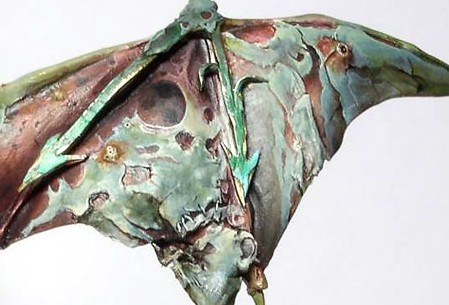
And that’s what the wings looked like in the end (I only painted some chipped paint on the green arrows later.):

Photo: How to paint Demon Prince of Nurgle wings - Tutorial

If you still have any questions or suggestions – feel free to share them in a comment. I’ll try to check them and leave answers.

Enjoy your painting and share your results!

— Ańa