Midnight Lurker's Crap

Post your "Work In Progress" photos here.
Forum rules
Post pictures and discussions regarding works in progress here, please. If you have photos of these works when they're completed, feel free to post them to the right section and feel free to add the link in your post about the work in progress.
Corvus
Guardian of Law & Order
Posts: 2560
Joined: 9 May 2005, o 12:13
Location: Antwerp, Belgium
Contact:

Re: Midnight Lurker's Crap

Post by Corvus »

Midnight Lurker wrote:Awesome! Please ask him! Thanks!
I did and here's what he has to say:

Gerrie,

This is sort of a tough question. However, I think that the issue is actually pretty simple, any colour background will bounce light back onto the model. Depending on the tone of the background, the light will change slightly. The photo you linked from your site really illustrates this.

If you have a white balance on your camera, that you can manually adjust, it might be worthwhile to play with the settings. Using a white piece of paper, or plasticard, is definitely a good idea.

On some level, you may actually want this phenomenon to occur. Some people like the tone a coloured background gives (I attached a photo here of a model I just finished with a brown background-the brown background, I think, enhanced the tone of the figure). Typically, though, I think a blue gradient gives a very “true” look, so people tend to use it.

Does this help? I say adjust your white balance if you can, but use the colour backgrounds for certain effects.

Dave


I think his advice about choosing a background which fits the figure is very useful. Each miniature might benefit from its own specific background to help create a certain mood.

On the other hand I don't think he's correct about the color being reflected on the mini... A background is placed behind the figure right, so how can the color reflect on the front of the mini....
mahon
Super Villain
Super Villain
Posts: 23961
Joined: 31 Mar 2005, o 23:36
Location: Poznan, Poland
Contact:

Re: Midnight Lurker's Crap

Post by mahon »

Well, if you want to do more photo editing any amount of extra information will be useful. For most photos I only use the black and white samples and generally it works fine.
As for overexposition, well, it's only you who will know if the picture is fine, too dark (underexposed) or too pale (overexposed). There are some tools which will help you evaluate it.

Your camera has the option of turning a histogram on the LCD screen on, and the same can be done in GIMP/PS. More about histograms:
https://www.luminous-landscape.com/tutor ... rams.shtml
https://www.dpreview.com/learn/?/Glossar ... ram_01.htm - good one

It's a very useful tool. Nothing automatic, but a good guide. And believe me - automatic is never as good as manual, but it's easier and faster.

The canon you have is more or less (rather more) the camera I use. I'll be glad to help as I am fairly familiar with it :)
-- Mahoń

Image

Back in the garage with my bullshit detector
Corvus
Guardian of Law & Order
Posts: 2560
Joined: 9 May 2005, o 12:13
Location: Antwerp, Belgium
Contact:

Re: Midnight Lurker's Crap

Post by Corvus »

mahon wrote:Your camera has the option of turning a histogram on the LCD screen on
Mine has that one too, but never used it. I'll check out the articles you posted, thanks!
mahon
Super Villain
Super Villain
Posts: 23961
Joined: 31 Mar 2005, o 23:36
Location: Poznan, Poland
Contact:

Re: Midnight Lurker's Crap

Post by mahon »

it's good because it allows you to avoid 2 errors which are irreparable:
- picture underexposed beyond any chance of repair (shadows are black and details in shadows lost)
- picture overexposed beyond any chance of repair (highlights are burned out from the picture)

you simply need to watch the histogram and not allow it to move off the scale to the left or right

and if you know if your picture should be dark or light you will know roughly what kind of histogram to expect.
good tool, usually not used often enough...
-- Mahoń

Image

Back in the garage with my bullshit detector
Maru
Camera Expert
Camera Expert
Posts: 3631
Joined: 4 Jun 2005, o 01:22

Re: Midnight Lurker's Crap

Post by Maru »

@Mahoń
The canon you have is more or less (rather more) the camera I use.
well it is exacly same camera you use :P - 350D is a name of a Body "Rebel XT" it is name for a kit a body + lens :)
@Midnight Lurker
I even have a macro lens
wich 1 ?? (a parameters will be near lens - somthing X somthing) - im asking cos it mey be totaly usless for minis - well just to strong
I can't figure out how you were able to tell my aperture setting was 2.9 just by looking at the jpegs!
Exif :)
Mahon: I know someone who has an index card they shoot with that has the black and white, but also cyan, magenta etc. In your opinion are the extra colors valuable or redundant?
thats for printing in CMYK in RGB you will do fine with B/W some times + grey
Gimp or PS that will "tell me" that a shot is over exposed? Or is it just a matter of common sense and using your eye to see if things are washed out looking?
nor PS or Gimp - just Levels . but your camera in histogram mode will highttight over exposed areas like on the sample below
ImageClick to see full-sized image
end yes ther are programs that will show you wich part is over wich under lighted .. but thous dont usualy let you corect that .. -_-' (a lot of chances that you got somthing like canon grapric program ob CD with cammera - it will include that + Levels .. but realy Levels from Gimp/Ps are better ... but dont show what is wrong . )
@ Mahoń
And believe me - automatic is never as good as manual,
secound that +

@Corvus
On the other hand I don't think he's correct about the color being reflected on the mini... A background is placed behind the figure right, so how can the color reflect on the front of the mini....
it is not that .. it reflect on some particular part of the mini it is like filter for global light that go to camara lens end by this adding a particular hue to whole photo .. more or less it is Phisic - optic ^-^
"GOOD RACK CAN MAKE A DONKEY ATTACK LION"
https://maru.worldblogcafe.com/
Image
mahon
Super Villain
Super Villain
Posts: 23961
Joined: 31 Mar 2005, o 23:36
Location: Poznan, Poland
Contact:

Re: Midnight Lurker's Crap

Post by mahon »

yeah, right. i thought I remembered it right that it was the same camera but I wasn't quite sure.
-- Mahoń

Image

Back in the garage with my bullshit detector
Midnight Lurker
Posts: 51
Joined: 5 Mar 2010, o 02:59
Contact:

Re: Midnight Lurker's Crap

Post by Midnight Lurker »

Okay you guys, I think I'm ready to give this one more try. I've got two different minis I need to shoot, and my Hubby and I are going to try and do it with the DSLR. :bonk:

Maru: You asked what kind of macro lens I had, 'cause maybe it won't even be good for using on minis. What I have is a Canon EFS lens, "EF-S60mm f/2.8 Macro USM". I also have another lens: Canon EFS 18-55mm <flower symbol> 0.28m/0.9ft.

My plan is to shoot at night (so I can control the light) using the usual set up that I showed you earlier in this thread.

A question about histograms: for correct exposure should the tallest spike on either end be right up next to the edge of the graph, or a few steps inside with a couple smaller spikes at the edge?

Manual is better than Auto: Does this rule also apply to focusing or mostly just to settings?

Light temperature: Is there a way to tell what the actual temp of the light bulbs is by looking at the writing on the bulb? I've lost the box they came in... When I look at the bulbs against a white background, they have a pink tint. I thought I remembered them being labeled as "daylight", but maybe I'm wrong! :doh:

Laters,
Jen
Image
Maru
Camera Expert
Camera Expert
Posts: 3631
Joined: 4 Jun 2005, o 01:22

Re: Midnight Lurker's Crap

Post by Maru »

sory for not answering erlier . thifs stole cables from phone centrale ... so i whas oit of net ... :bonk:
A question about histograms: for correct exposure should the tallest spike on either end be right up next to the edge of the graph, or a few steps inside with a couple smaller spikes at the edge?
och um well .. thats loong .. Thanx goodes sombody alrdy describe it :) (mahon ardy posted that if i rymember)
https://www.dpreview.com/learn/?/Glossar ... ram_01.htm
end yes better under lighted photo then over lighted
end ther is nothing like perfect Histogram .. as ther is no universal 1
for instance
https://www.youtube.com/watch?v=aqyjQ6-a ... re=channel
in this Vid histogram would be a high at end end begining but flat at midle as the intend of this Video is such so i s perfect fot it
so for photo .. of mini well good 1 will be the 1 thats dont run out of the histogram on one of the sides (especialy right side)
as in the article caled "Correctly exposed image" this spike on left side well that propably dark green area on the rocks , then you got hill like in mid tones end nice end slowly droping to the lights wivh meam photo is not over expoused (well it could drop iven softer so the see breeze would end whiter - butthat a risk of over exposuring)

Manual is better than Auto: Does this rule also apply to focusing or mostly just to settings?
well that depend on what firm you stuff using as is Cannon you mey stey with Auto focus as Canon got good 1 :)
set in "central" if you can - you dont need to make sharp photo of baccground only the mini :) (system of metering - "Centrral" or somthing like that (AF Central/ whole , 11 spot , 3 spot end somthing like that )

go for "Aperture Priority" in making photo - usualy you will be able to set nice field of depth without matematical knowlege how to count how time shutter to sett (well digital corection is posible ... end usualy used AP +/- button)
Light temperature: Is there a way to tell what the actual temp of the light bulbs is by looking at the writing on the bulb? I've lost the box they came in... When I look at the bulbs against a white background, they have a pink tint. I thought I remembered them being labeled as "daylight", but maybe I'm wrong!
well if they came from a good firm they wil have on them somthing like 5500k , 6000k , end so on thats light color (power) in Kelvins
ther you go again :)
https://www.dpreview.com/learn/?/Glossar ... nce_01.htm
what i would done without this page ... (well write it by my selfe ... i think :P)

beside that ther is a device called light metter ... well it teal detiled data about curent light sun or artifical ... but it is separed device end a good 1 is caind of costly ..

[rimg]Maru:%20You%20asked%20what%20kind%20of%20macro%20lens%20I%20had,%20'cause%20maybe%20it%20won't%20even%20be%20good%20for%20using%20on%20minis.%20What%20I%20have%20is%20a%20Canon%20EFS%20lens,%20"EF-S60mm%20f/2.8%20Macro%20USM".%20I%20also%20have%20another%20lens:%20Canon%20EFS%2018-55mm%20<flower%20symbol>%200.28m/0.9ft.[/rimg]

Canon EFS 18-55mm <flower symbol> 0.28m/0.9ft. - that "kit lense " as i rymember well it will do
"EF-S60mm f/2.8 Macro USM" ... it will do better ..... if it sharps on about 25 Cm from lense (are at least 15 cm ... you whana took a picture of a mini not a Flay .. )
"GOOD RACK CAN MAKE A DONKEY ATTACK LION"
https://maru.worldblogcafe.com/
Image
Midnight Lurker
Posts: 51
Joined: 5 Mar 2010, o 02:59
Contact:

Re: Midnight Lurker's Crap

Post by Midnight Lurker »

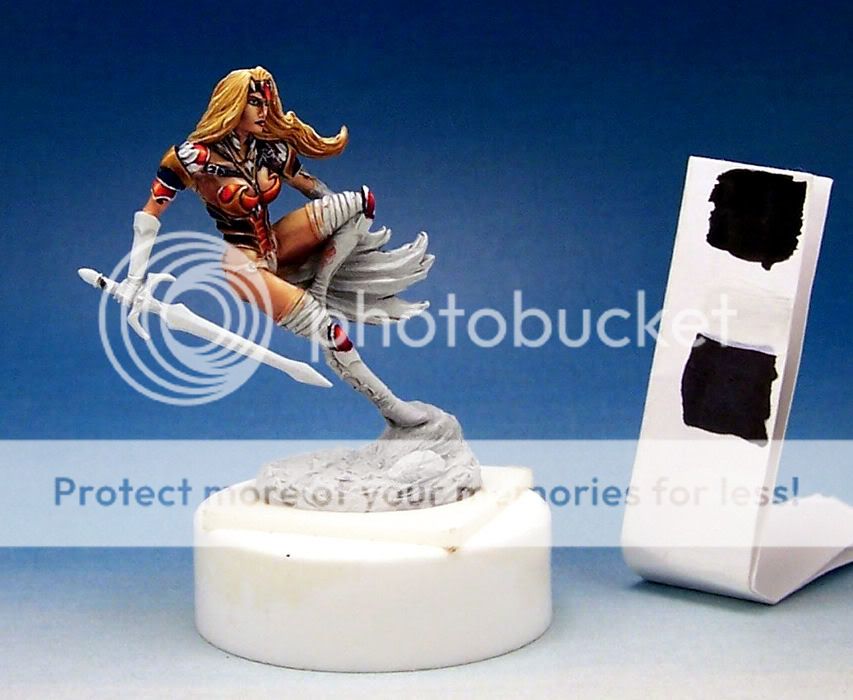
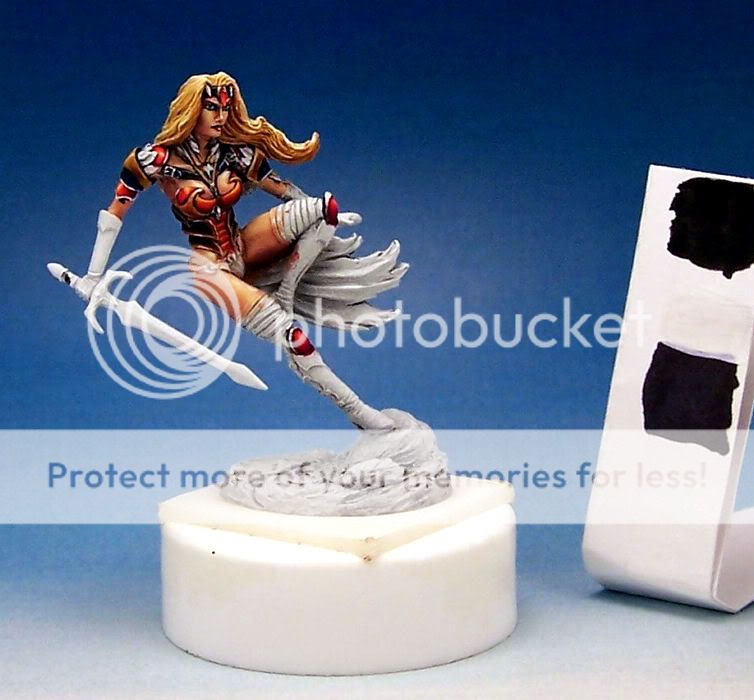
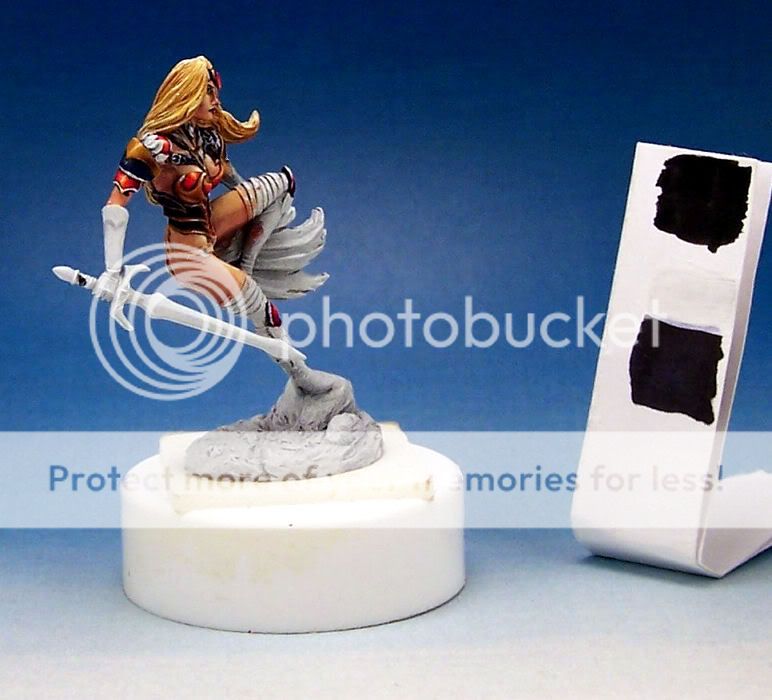
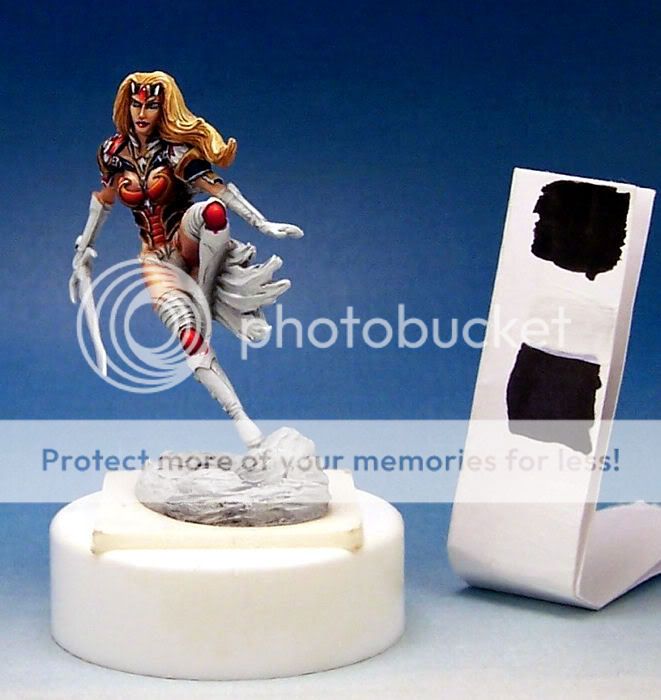
Since my photography skills still suck, I have included the white balancing stick in these pics. Hopefully that will be helpful to someone out there!

Okay, so I'm working on this Darksword mini and I'm wondering about shifting the colors a little. What's bothering me is that it looks like the red is blurring in with the warm NMM. They seem to be visually bleeding into one another, even with the darklining.

Right now I have warm orange toned reds... GW mostly, some really dark purple, red gore, VMC vermillion then all the way up to GW golden yellow. The NMM is scorched brown, beastial brown, snakebite leather, golden yellow on up to white.

My plan is to make the boots blue black (like the side plating on her ribcage) and the skirt a dirty grayed out ivory. Her wings will be a medium to dark reddish brown on the upper edges fading down to warm ivory on the bottoms. I would really like to keep the red/gold/black thing going for the armor, but need advice on how to make them harmonize and yet still contrast enough to pop. Should I be shifting the gold to a cold green undertone? Or would that just make everything muddy?

Thoughts? Suggestions? Please don't hold back!

Jen

By they way, this is still really rough and I know that, so please try to look past the scratchy blends, etc. for now. I didn't want to get too far invested until I resolved this issue. Once I can figure out how to balance the overall I will address the everything else, and then you can tear it apart for me! :D

ImageClick to see full-sized image
Image
Maru
Camera Expert
Camera Expert
Posts: 3631
Joined: 4 Jun 2005, o 01:22

Re: Midnight Lurker's Crap

Post by Maru »

o hello :)
you got ther quite good photos *a bit dark - but that easy to fix controary to to light ones )

if you mix a red (warm) end place nead it gold warm one - well it will meld iven if you make mettaliks a real 1 if it will be warm + warm it will meld
so live with it :) end make it a (monohromatic warm minature) or insstade black inking add a cold purple to neither gold or red wich will turn it to cold (or add cold blue hue to gold - ice ble ?? )

adding green to red = mudy brown - wery cool color but not exacly in place

(for better photos - if the "base" would be not so white - it blings cameta at this moment so rest of photo is under lightned - if you put ther somrthing neutral (no black is not neutral) it solvs problem
My plan is to make the boots blue black (like the side plating on her ribcage)
+1
nd the skirt a dirty grayed out ivory.
dunno this 1 - mey look odd
Her wings will be a medium to dark reddish brown on the upper edges fading down to warm ivory on the bottoms.
wil this not mix ./ meld with hairs - she is a blonde
"GOOD RACK CAN MAKE A DONKEY ATTACK LION"
https://maru.worldblogcafe.com/
Image
Post Reply