Chaos Sorcerer

Show us your *finished* works here...
Forum rules
Post pictures and discussions regarding finished models here, please. If you have WIP (work in progress) photos, feel free to post them to the right section and feel free to add the link in your post about the finished work.
Post Reply
Vent
(Forum newbie)
Posts: 5
Joined: 15 Oct 2012, o 07:28

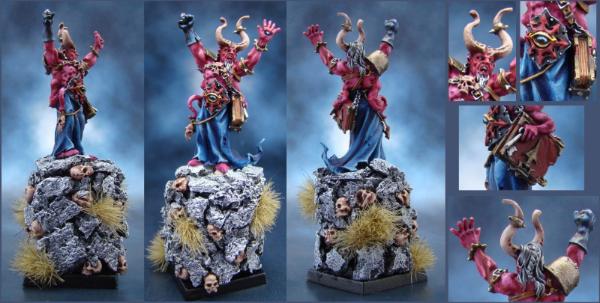
Chaos Sorcerer

Post by Vent »

Hi folks, I've always been a little tentative about posting my miniatures on this forum, mainly due to the astounding level of work I consistently see on here, but I want to get better and that will only come through constructive criticism of my work which is why I'm here.

This is my latest miniature; I'd love to hear some feedback on what I need to improve on.

Image

There is a larger image located here.

Thanks in advance.
Nameless
The Better Choice
The Better Choice
Posts: 17415
Joined: 21 Jun 2005, o 17:41
Location: Silesia, Poland
Contact:

Re: Chaos Sorcerer

Post by Nameless »

welcome to the forum :)
paintjob looks nice, it's rather neat. some transitions could be smoother, like on the blue robes.
and highlighting edges would help to build the 3D effect :)
Image
Maru
Camera Expert
Camera Expert
Posts: 3631
Joined: 4 Jun 2005, o 01:22

Re: Chaos Sorcerer

Post by Maru »

well if you actualy swich your picture to grey scale mode - you will c exacly wichparts lacks the contrast :)
"GOOD RACK CAN MAKE A DONKEY ATTACK LION"
https://maru.worldblogcafe.com/
Image
Vent
(Forum newbie)
Posts: 5
Joined: 15 Oct 2012, o 07:28

Re: Chaos Sorcerer

Post by Vent »

Nameless wrote:welcome to the forum :)
paintjob looks nice, it's rather neat. some transitions could be smoother, like on the blue robes.
and highlighting edges would help to build the 3D effect :)
Thanks Nameless. I had some trouble with the robes, so making smoother transitions is high on my list of things to practice. As for highlighting, do you mean all the edges, or the robe edges?
Maru wrote:well if you actualy swich your picture to grey scale mode - you will c exacly wichparts lacks the contrast :)
I'd never even thought about trying that. Thanks Maru.
Demi_morgana
Chest of Colors
Chest of Colors
Posts: 15233
Joined: 9 Apr 2005, o 02:51
Location: Eldorado
Contact:

Re: Chaos Sorcerer

Post by Demi_morgana »

Likey :)
To make it look more "coherent" you could paint some deep purple shadows on clothes and some deep blue on the body.
My 2€-cents only ^^
Image

Hobby blog

Katoliku uważaj!
Vent
(Forum newbie)
Posts: 5
Joined: 15 Oct 2012, o 07:28

Re: Chaos Sorcerer

Post by Vent »

Demi_morgana wrote: To make it look more "coherent" you could paint some deep purple shadows on clothes and some deep blue on the body.
My 2€-cents only ^^
Is this to tie the purple and blue closer together? Should it only be in the deepest darkest parts of each respective color?
Demi_morgana
Chest of Colors
Chest of Colors
Posts: 15233
Joined: 9 Apr 2005, o 02:51
Location: Eldorado
Contact:

Re: Chaos Sorcerer

Post by Demi_morgana »

Vent wrote:Is this to tie the purple and blue closer together?
Yeah.

Enchancing some deepest shadows should do the job I think :)
Image

Hobby blog

Katoliku uważaj!
Nameless
The Better Choice
The Better Choice
Posts: 17415
Joined: 21 Jun 2005, o 17:41
Location: Silesia, Poland
Contact:

Re: Chaos Sorcerer

Post by Nameless »

Vent wrote: As for highlighting, do you mean all the edges, or the robe edges?
well, it works best with sharp edges - armour plates etc. you could use it e.g. on chaos star on his belly
Image
Post Reply