Forum rules
Post pictures and discussions regarding finished models here, please. If you have WIP (work in progress) photos, feel free to post them to the right section and feel free to add the link in your post about the finished work.
I'd like to start a thread dedicated to the few that actually make it off my workbench. With me being a sloooow painter ant not having much time to paint I just hope I can update the thread from time to time before it starts collecting cobwebs ...
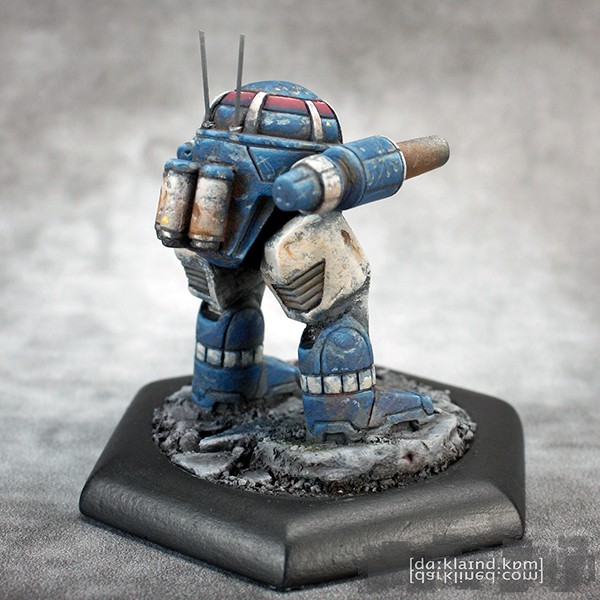
Having said that I am a slow painter I want start my showcase with a real speedpaint - a miniature for which I barely a month from purchase to display gallery. The miniature in question is a BattleTech miniature from Ironwind Metals - an UrbanMech IIC. For those of you not familiar with BattleTech it is 6mm scale. Mech in universe are between 8-15 metres tall this means the UrbabMech is roughly 30mm in size making it comparable to a Skaven miniature from Games Workshop. Anyway for the painting I experimented a lot with trying out different ways of achieving certain effects. The result is not really what I had in mind originally, but I think I managed to 'salvage' the paintjob and create an ok looking miniature.
I like the model and the paintjob, but if you're looking for some bruises here, my main complaint would be about the battle damage. I know that we must remember about the size of the thing, but....
... look at the first pic, especially its resized version (as it brings the model to a scale more comparable with the real thing) - do the scratches there look like scratches?
To me they look more like some kind of urban cammo, dots, or something along these lines.
The best damage you did is placed on the ivory-colored parts on its legs and on the blue part of the right leg (last photo). It has more depth, more volume, looks more interesting.
mahon wrote:I like the model and the paintjob, but if you're looking for some bruises here, my main complaint would be about the battle damage. I know that we must remember about the size of the thing, but....
... look at the first pic, especially its resized version (as it brings the model to a scale more comparable with the real thing) - do the scratches there look like scratches?
To me they look more like some kind of urban cammo, dots, or something along these lines.
The best damage you did is placed on the ivory-colored parts on its legs and on the blue part of the right leg (last photo). It has more depth, more volume, looks more interesting.
What do you think?
Yes, I agree. My original plan for the miniature was for a Mech were most of the paint had been stripped by exposure to heavy combat in an urban environment with debris and rubble from destroyed building flying around. Having more or less successfully done small battledamage on Mechs in the past I wanted to introduce another level showing just scratched away paint. To do this I first painted all the armor panel in grey imagining this to be the 'factory color'. Next I applied the blue and ivory using a blister sponge, but the result wasn't what I had imagined. I went back and forth de- and refining the chipped paint, adding volume, shading, highlighting until I felt the paintjob 'salvaged'. But as a result some of the scratches - especially the bigger ones - look more like camo due to the underlying grey and making them look out of scale. All in all an experiment that didn't work out as planned ... back to the drawing board for this effect
loks bumpy buy like Mahon sed blue parts thats urban cammopattern or blue marble
the trick with sponge is good but you need to repare sponge :
to make things random , to make it realy tiny
If I try this again (painting a miniature in a 'factory grey', then trying to randomly apply the main colors) I will probably try liquid mask and paint the main colors with a brush using the sponge technique only 'traditionally' for the battle damage.
The challenge however is how do I create the impression that the grey spots are an underlying layer of paint (an not a deep scratch or dent). I have tried to shade the upper parts and highlight the lower parts (as with battle damage) but this doesn't work too well with grey. As was pointed out those spots still lack depth. But if I go darker with the grey and/or more extreme with the shades/highlights it will quickly look like 'normal' battle damage ... Time for more experiments I guess
 Click to see full-sized image